openclaw-soft-engine
🦞 OpenClaw Soft Engine (Expert Matrix v2.0)
🌐 Language
- English (current)
- 简体中文




Note: This project is a deployment template and enhancement layer for OpenClaw. It is not the official OpenClaw distribution.
OpenClaw Soft Engine is a production-oriented execution layer that upgrades OpenClaw with structured routing, multi-expert model orchestration, and hardened guardrails. It combines a DAG-based task protocol with multi-expert model routing to improve execution control, route-level isolation, and concurrent task handling.
This guide documents the full evolution from v1.0 “Six-Model Matrix” to v2.0 “Soft Execution Engine.”
Architecture Diagram

Who is this for?
- Developers deploying OpenClaw in production or semi-production environments
- Users who need multi-model routing and better execution stability
- Engineers experimenting with agent orchestration and DAG-based workflows
Table of Contents
- Key Features
- Tested Environment
- Prerequisites (Must Read)
- Deployment Steps (Core 10 Steps)
- Successful Deployment Examples
- Service Management & Stopping
- Troubleshooting Guide
- Security Considerations
- Repository Structure
- References
- About the Author
Key Features
Compared with v1.0, this version introduces a more structured and production-oriented architecture:
| Feature | Description |
|---|---|
| Multi-Expert Intelligent Dispatch | Dynamically routes payloads by type: regular chat and tool calls go to DeepSeek-V3.2, deep reasoning to DeepSeek-R1, and vision or code workloads to Qwen-series expert models. |
| API Key Pool Isolation | Uses separate API keys for Text, Tool, Vision, Reasoning, Code, and Embedding routes to prevent rate-limit contention across routes. If a key is compromised, it can be revoked independently without affecting other routes. |
| Cross-Modal Data Sanitization | Automatically strips image data from requests sent to text-only models (such as DeepSeek-R1) to prevent context-parsing errors and upstream 400 failures. |
| Resource Guardrails | The proxy container is hard-limited to 512MB of memory to prevent OOM crashes. External fetch tools enforce a strict 45-second timeout via AbortController to prevent process hangs and memory exhaustion. |
| Environment-Variable-Driven Configuration | All sensitive values are injected through .env, keeping credentials out of source code entirely. |
Tested Environment
| Item | Details |
|---|---|
| OS | Windows 11 Home China 25H2 (64-bit) |
| CPU | AMD Ryzen 9 7945HX (16-core) |
| RAM | 16GB DDR5 5200MHz |
| GPU | NVIDIA GeForce RTX 5070 Ti Laptop GPU (12GB) |
| Docker | Docker Desktop |
| Models | DeepSeek (V3.2 / R1) · Qwen3 (VL / Coder) · BAAI (bge-m3 / reranker) |
Prerequisites (Must Read)
1. Enable Windows Virtualization and WSL2
Docker on Windows 11 requires WSL2.
- Verify that CPU virtualization is enabled in BIOS: open Task Manager → Performance → CPU → confirm Virtualization: Enabled.
- Open PowerShell as Administrator and run the command below, then restart your computer:
wsl --install
2. Install Git and Docker Desktop
- Git: https://git-scm.com
- Docker Desktop: https://www.docker.com — during installation, select Use WSL 2 based engine.
3. Obtain API Keys
Get OpenAI-compatible API keys from a supported provider such as SiliconFlow, the official DeepSeek platform, or any other compatible platform.
For better isolation under concurrent load, create separate keys for each route and configure them individually in .env:
| Route | Purpose |
|---|---|
| Text & Tool | Central brain — general chat and tool dispatch |
| Vision & Code | Qwen expert models |
| Reasoning | DeepSeek-R1 deep reasoning |
| Embedding | BGE-M3 vector memory |
Why separate keys? If one route (e.g. a web-scraping tool call) triggers a rate limit, the other routes remain unaffected. Each key can also be revoked independently if leaked, without disrupting the rest of the system.
Deployment Steps (Core 10 Steps)
Step 1: Configure a Git Proxy (Optional — for users behind restricted networks)
git config --global http.proxy http://127.0.0.1:10808
git config --global https.proxy http://127.0.0.1:10808
Step 2: Clone the OpenClaw Repository
cd D:\AI
git clone --depth 1 https://github.com/openclaw/openclaw
cd openclaw
Step 3: Copy This Repository’s Files into the OpenClaw Directory
# Clone the Soft Engine template
git clone https://github.com/Syysean/openclaw-soft-engine D:\AI\openclaw-deploy

# Overlay core gateway, orchestration, and environment files
Copy-Item D:\AI\openclaw-deploy\proxy.js .\proxy.js -Force
Copy-Item D:\AI\openclaw-deploy\docker-compose.yml .\docker-compose.yml -Force
Copy-Item D:\AI\openclaw-deploy\.env.example .\.env.example -Force

# Deploy sandbox configuration and the v2.0 hardened toolchain
Copy-Item D:\AI\openclaw-deploy\config\openclaw.example.json .\config\ -Force
Copy-Item D:\AI\openclaw-deploy\workspace\* .\workspace\ -Recurse -Force
Step 4: Configure Environment Variables
Copy the template files and fill in the real values:
Copy-Item .env.example .env
Copy-Item config\openclaw.example.json config\openclaw.json

notepad .env
Required variables:
# Generate a secure gateway token with:
# openssl rand -hex 24
OPENCLAW_GATEWAY_TOKEN=your_generated_token

# Multi-route API key pool
MATRIX_TEXT_API_KEY=sk-...
MATRIX_TOOL_API_KEY=sk-...
MATRIX_VISION_API_KEY=sk-...
MATRIX_REASONING_API_KEY=sk-...
MATRIX_CODE_API_KEY=sk-...
MATRIX_EMBED_API_KEY=sk-...

# Optional — required for the web_fetch tool
JINA_API_KEY=jina_...
Important: Do not add spaces before or after
=in.env. Extra whitespace will cause the key to be read as an empty string.
Step 5: Build the Docker Image
docker build -t openclaw:local .
If you see
unexpected EOFduring the build, this is a transient network interruption. Simply re-run the command.
Step 6: Start All Containers
docker compose up -d
docker compose ps
All services should show STATUS: Up. Verify that the smart routing proxy has initialized correctly:
docker compose logs -f matrix-proxy
You should see initialization output similar to the following:
[proxy] ══════════════════════════════════════
[proxy] Smart routing proxy on :13001 (Coordinator Phase 1)
[proxy] ──────────────────────────────────────
[proxy]  Central brain (text/tool) -> Pro/deepseek-ai/DeepSeek-V3.2
[proxy]  Vision expert  (vision)   -> Qwen/Qwen3-VL-32B-Instruct
[proxy]  Reasoning expert (reason) -> Pro/deepseek-ai/DeepSeek-R1
[proxy]  Code expert    (code)     -> Qwen/Qwen3-Coder-30B-A3B-Instruct
[proxy] ──────────────────────────────────────
Step 7: Run the Configuration Wizard
docker compose run --rm openclaw-cli configure
Follow the prompts and select the following values:
| Option | Value |
|---|---|
| Gateway location | Local (this machine) |
| Configuration target | Gateway |
| Gateway port | 18789 |
| Gateway bind mode | LAN (All interfaces) |
| Gateway auth | Token |
| Tailscale exposure | Off |
| Gateway token | The value of OPENCLAW_GATEWAY_TOKEN from your .env |
Step 8: Run a Health Check
docker compose run --rm openclaw-cli health
A successful setup will report Gateway: reachable.
Step 9: Test the Terminal Agent
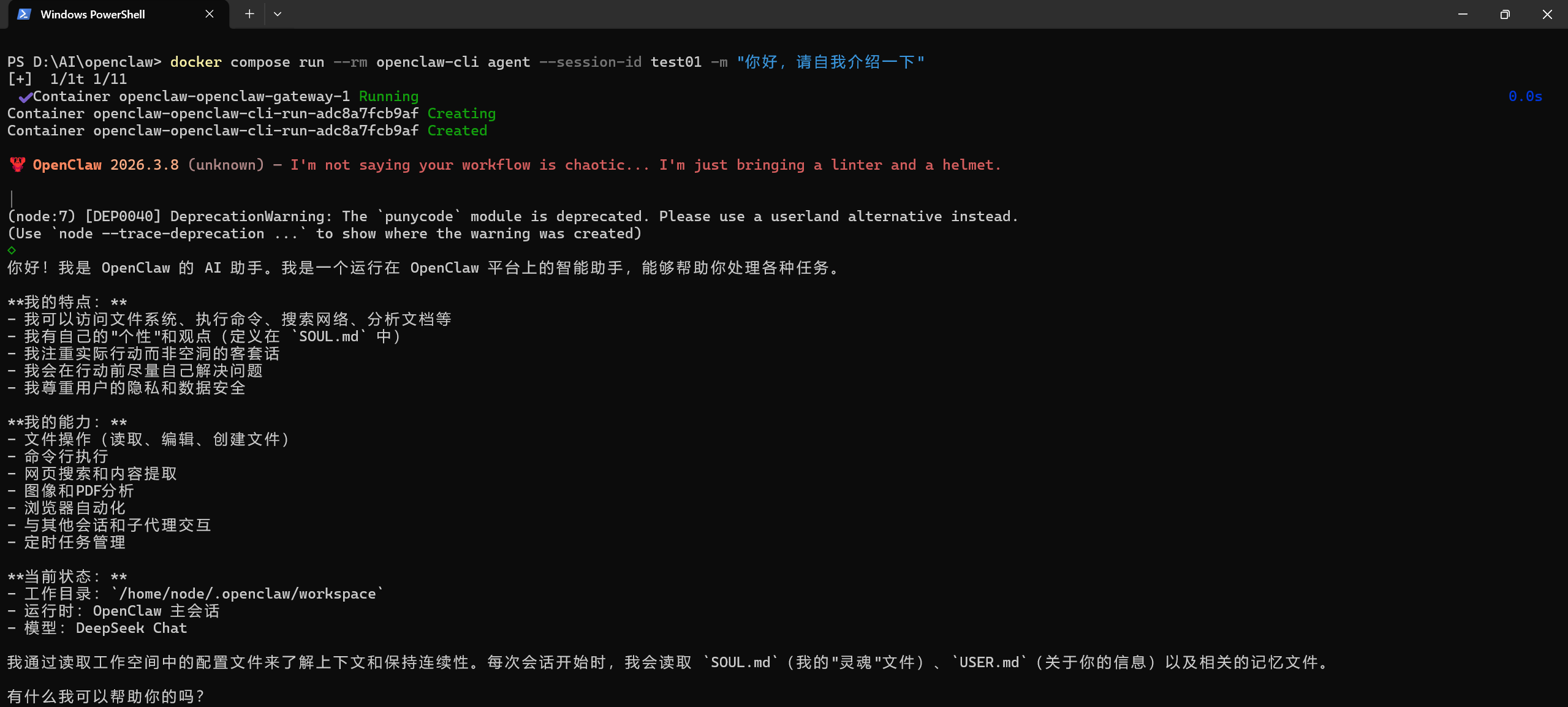
docker compose run --rm openclaw-cli agent --session-id test01 -m "Hello, please ask the code expert to write a simple C++ snippet"
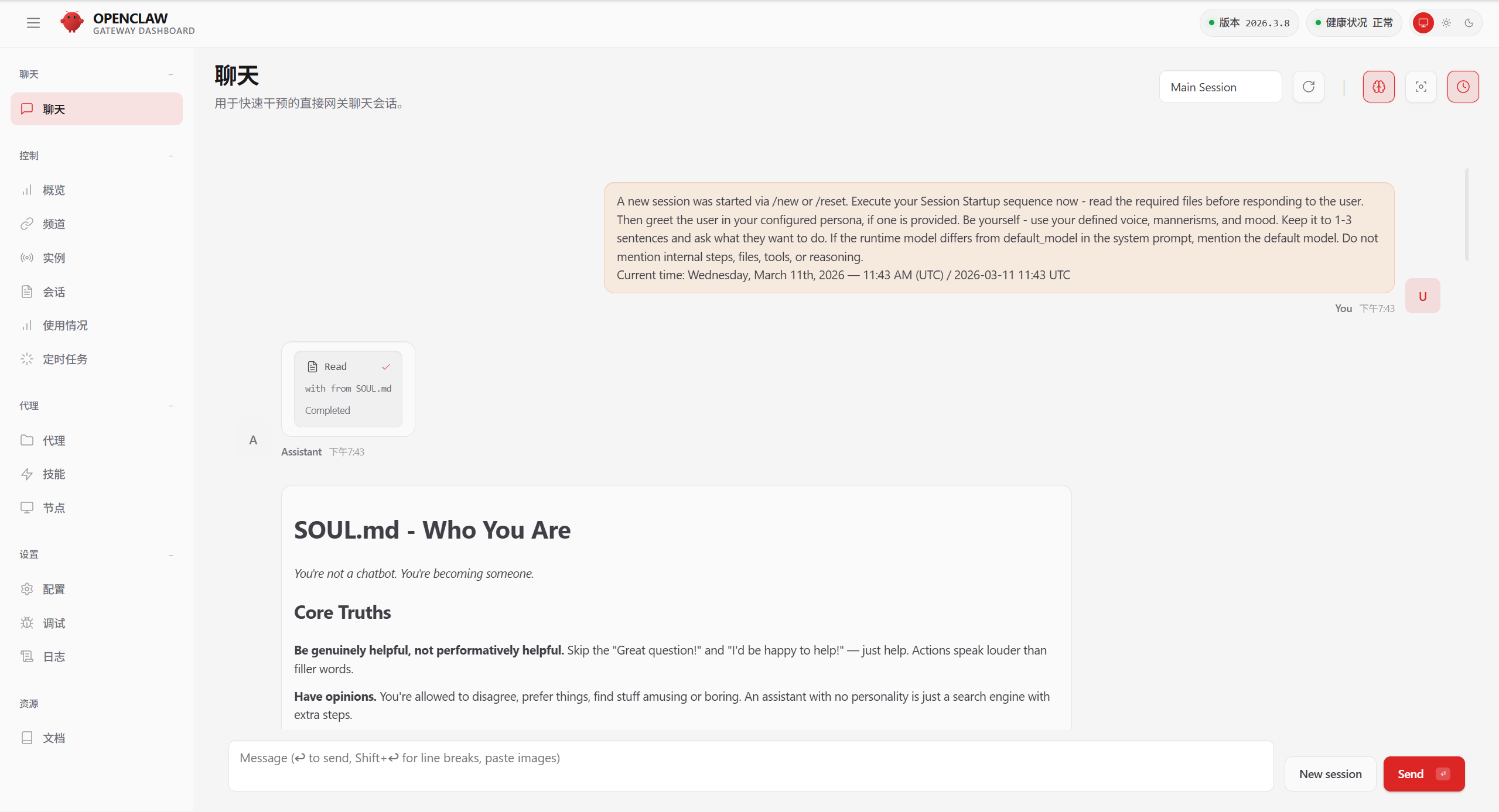
Step 10: Access the Web UI and Approve the Device
- Open
http://localhost:18789in your browser. - Enter the Gateway Token and connect.
- If this is the first connection from this browser, approve the device pairing request:
# List pending device requests
docker compose run --rm openclaw-cli devices list

# Approve by request ID
docker compose run --rm openclaw-cli devices approve <requestId>
Successful Deployment Examples
Terminal Chat
Web Interface
Service Management & Stopping
# Stop containers but preserve state
docker compose stop

# Stop and remove containers
docker compose down

# Stream all logs in real time
docker compose logs -f

# Stream only the proxy routing logs
docker compose logs -f matrix-proxy
Troubleshooting Guide
Click to expand the full troubleshooting reference
Container and Image Issues
1. pull access denied for openclaw
Symptom: Docker attempts to pull the image from a remote registry and fails.
Fix: The official OpenClaw engine image is not publicly published. Build it locally:
docker build -t openclaw:local .
2. Container exits with OOMKilled or Exit Code 137
Symptom: The gateway container crashes and restarts repeatedly.
Fix: A payload exceeded the 512MB memory hard limit. This is typically caused by sending a large uncompressed image (>10MB) directly. Use the provided ask_vision.cjs tool to intercept and size-check image payloads before they reach the gateway.
Network and Gateway Issues
3. [proxy] request error: client disconnected
Symptom: The gateway or upstream provider drops the connection.
Fix: Occasional occurrences are normal — this is standard Node.js Keep-Alive lifecycle behavior. If this error appears frequently alongside 502 responses, it indicates that an upstream API key has hit its rate limit. Increase the size of your key pool.
4. LLM request timed out
Symptom: The proxy gateway receives no response from the upstream model.
Fix: Check docker compose logs -f matrix-proxy. This is usually caused by upstream server congestion or the proxy container being in an unhealthy state. Restart the proxy container if needed.
5. ERR_EMPTY_RESPONSE / non-loopback Control UI requires...
Symptom: The Control UI refuses the cross-origin request or the gateway fails to resolve its own origin.
Fix: When the gateway is bound to LAN mode, add "dangerouslyAllowHostHeaderOriginFallback": true to openclaw.json to allow cross-origin header validation.
Authentication Issues
6. MATRIX_TEXT_API_KEY is not set
Symptom: The system reports that one or more API keys are missing on startup.
Fix: Open .env and check for typos in the MATRIX_* variable names. Ensure there are no spaces before or after the = sign — a space causes the value to be parsed as an empty string.
7. Verification failed: status 402
Symptom: The upstream model route is reachable but refuses to serve the request.
Fix: The API quota for this key has been exhausted. Top up your account balance in the upstream provider’s console.
8. gateway token mismatch / unauthorized: gateway token missing
Symptom: The authentication handshake fails when connecting from the browser or CLI.
Fix: The token in your browser or .env does not match the value stored in openclaw.json. Re-run the configure wizard to overwrite the stored configuration with the current token.
9. pairing required
Symptom: A new terminal or browser session is blocked from connecting.
Fix: New clients must be approved before they can communicate with the gateway. Use devices list to see pending requests, then devices approve <id> to authorize the connection.
Configuration Issues
10. Missing config (Gateway restarts in a loop)
Symptom: The gateway container starts and immediately exits, then restarts.
Fix: Make sure you are using the docker-compose.yml from this repository. It includes the required --allow-unconfigured startup flag that prevents this crash loop.
11. ERR_CONNECTION_REFUSED (Gateway container fails to start)
Symptom: The core service refuses all connections.
Fix: This is almost always caused by a JSON syntax error in openclaw.json — a missing comma or trailing bracket. Validate the file with a JSON linter, fix the error, and restart the container.
12. 404 status code (no body)
Symptom: The agent cannot route to the target model.
Fix: Verify that the model field in openclaw.json matches the exact model identifier used by your API provider. Model names differ between providers.
13. MATRIX_TEXT_API_KEY is not set (single-key error)
Symptom: The proxy starts without error but immediately reports a missing key.
Fix: This usually means the single-key proxy script from v1.0 is still active. Replace it with the latest multi-route proxy.js from this repository and restart the proxy container.
14. Tool processes hang indefinitely
Symptom: A call to web_fetch or another external tool causes the agent to stall with no response.
Fix: Confirm that the hardened scripts from workspace/tools/ have been copied correctly. The v2.0 toolchain includes a mandatory 45-second AbortController timeout guard. The v1.0 scripts do not.
Security Considerations
- Never commit
.envto GitHub..gitignoreis already configured to exclude it, but always verify before pushing. config/openclaw.jsonis preconfigured withsandbox: non-main, which restricts system-level command execution outside of the primary private chat context.- If the Gateway Token is exposed, regenerate it immediately, update
.env, and restart the gateway:docker compose restart openclaw-gateway
Repository Structure
├── proxy.js                            # Core routing engine: multimodal dispatch, stream repair, and cross-modal sanitization
├── docker-compose.yml                  # Orchestration: network topology, health checks, and container resource limits
├── docker-compose.override.example.yml # Override template for mounting local project paths into the workspace
├── .env.example                        # Environment template: six-route isolated key pool configuration
├── config/
│   └── openclaw.example.json           # Global security policy: sandbox level and authentication mode
└── workspace/                          # Soft Engine core workspace
    ├── AGENTS.md                       # Core protocol: DAG task scheduling, dependency resolution, and anti-hallucination rules
    ├── TOOLS.md                        # Infrastructure layer: routing table, physical boundaries, and directory conventions
    └── tools/                          # Hardened toolchain
        ├── ask_expert.cjs              # Expert dispatch: reasoning/code mode switching with 10-minute timeout protection
        ├── ask_vision.cjs              # Vision guardrail: media:// contract handling and 8MB OOM interception
        ├── web_fetch.cjs               # Web fetch helper: Jina/Firecrawl dual-engine fallback with 45-second circuit breaker
        └── deep_search.cjs             # Deep search helper: weighted local knowledge base retrieval
References
- OpenClaw Official Docs — https://docs.openclaw.ai
- OpenAI API Reference — https://platform.openai.com/docs/api-reference
- SiliconFlow API Reference — https://docs.siliconflow.cn
- Node.js Streams API — https://nodejs.org/api/stream.html
- Docker Compose Resource Controls — https://docs.docker.com/compose/compose-file/deploy/#resources
About the Author
Undergraduate student majoring in Robotics Engineering at Hunan University of Technology and Business.
Feel free to open an Issue or submit a PR for technical discussion.